

Important work often arrives as fragments: a question in one message, a file in another, and a tentative date near the end of a thread. The problem is not that the conversation is informal. It is that a message thread mixes facts, proposals, decisions, and open questions without giving each one a stable place.
An actionable document separates those roles without pretending that a vague message is a confirmed plan. The source-to-structured-document tool gives you a place to make that separation. You can also read the guide to moving from a raw source to a structured document before choosing whether the result belongs in a calendar or a workspace.

Keep the thread before you clean it up
Save the conversation link, export, or screenshot that you used. Record the participants, the local time zone if it matters, and the slice of the thread that carries the decision. A clean document without its context can make a useful sentence look more certain than it was.
For a dated thread, keep the timestamp next to the statement. RFC 3339 provides a widely used representation for date and time values, including an explicit offset. See the RFC 3339 specification when you need to compare timestamps from different systems. You do not need to turn a chat into a standards document, but you do need to know whether “tomorrow” was written in one person's time zone or another's.
Give every message a role
Use five labels during the first pass:
- Fact: something directly stated by a participant or visible in an attached file.
- Decision: an option explicitly accepted by the people who can make the call.
- Open question: information or a choice that is still missing.
- Candidate date: a possible time that has not been confirmed.
- Next step: a concrete follow-up with an owner or a named person to contact.
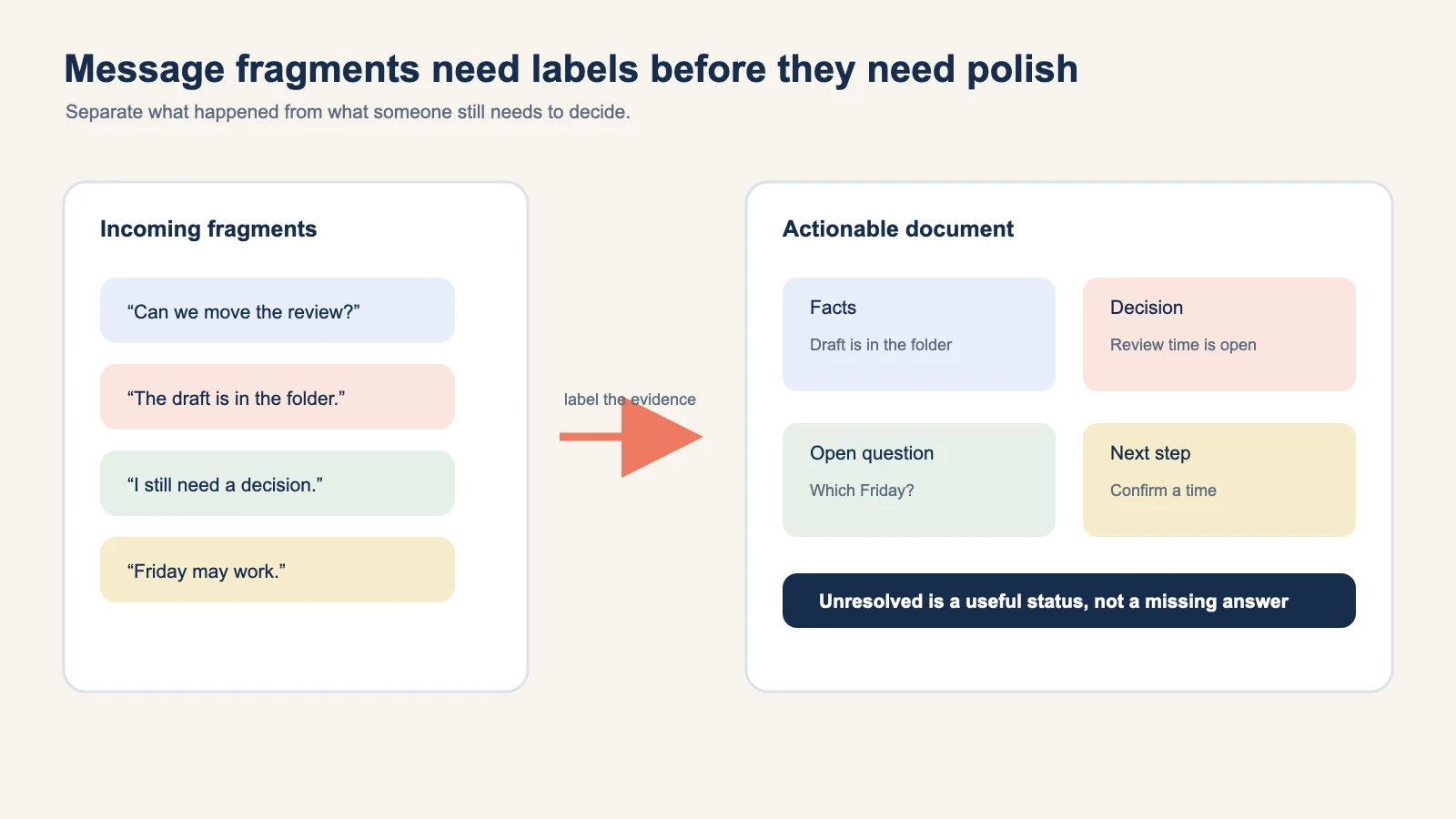
The labels are more important than the wording. “Can we move the review?” is an open question. “Friday may work” is a candidate date. “Let us meet Friday at 10” is still a proposal until someone accepts it. A document that keeps these statuses visible is more useful than one that sounds decisive.
Extract the smallest useful fields
For each message that matters, capture:
- Who: sender or responsible participant.
- When: message timestamp and any date mentioned in the text.
- What: the fact, decision, question, or proposed action.
- Why: the context that makes the message relevant.
- Status: confirmed, supported by context, candidate, or unresolved.
Do not copy greetings, reactions, or repeated signatures unless they change the meaning. Keep an attachment name or link when it is evidence. If a message says “the latest file,” include the actual filename so a reader can find it.
Separate decisions from the reasons around them
A decision is easier to revisit when the alternatives and rationale are close by. Use a compact table:
| Item | Record |
|---|---|
| Decision | What was explicitly accepted |
| Alternatives | The options that were discussed |
| Rationale | The reason given at the time |
| Owner | The person responsible for the next move |
| Review point | When the decision should be revisited |
If the thread contains only a suggestion, place it under Open questions or Candidate dates. Never promote it to Decision because it makes the document look finished.
Turn dates into reviewable fields
Message threads commonly mention several kinds of dates:
- the date the message was sent;
- the date an event begins;
- an arrival or preparation time;
- a deadline;
- a date someone is considering.
Keep them separate. A deadline is not a meeting. An arrival instruction is not the official event start. If the thread contains a time zone, record it. If it does not, mark the field for confirmation rather than silently using your local setting.
When a strong time signal is confirmed, Recap can prepare a Calendar Sheet for review. The review step matters because a user can confirm, edit, or cancel before sending. If the thread is still tentative, keep the candidate date in the document and send nothing.
Keep uncertainty useful
Uncertainty is not a defect to hide. It tells the next reader what to ask.
Write “owner not named,” “Friday needs a time,” or “link points to an older draft” instead of filling the gap with a guess. The NIST AI Risk Management Framework treats context and risk identification as part of trustworthy AI work. The same discipline helps with everyday message processing: a visible gap is easier to resolve than a polished sentence that is wrong.
If two messages conflict, show both statements and their timestamps. Use a conflict table:
| Field | Earlier message | Later message | Working status |
|---|---|---|---|
| Review date | Thursday | Friday | Confirm with owner |
| File | draft-v2 | draft-v3 | Use the later named file |
| Owner | not named | Taylor volunteers | Confirm scope with Taylor |
This gives the reader a correction path. It also keeps the source traceable when the thread is revisited.
Choose the destination after the action document is ready
An actionable document can go in several directions:
- Calendar: only for confirmed time-bearing commitments.
- Workspace: for project context, files, tasks, and reusable notes. Use source-to-workspace when that is the right home.
- Learning: for a question that needs comparison, evidence, and reflection. Use source-to-PBL Learning when the goal is understanding.
The destination should not decide what the thread meant. First make the meaning reviewable, then choose where the result belongs. A project update may need a workspace export today and a calendar reminder later. Keeping both options visible is safer than guessing which one the user intended.
When the team handoff belongs in a shared document, see how to move source-backed notes into Google Docs.
A message-to-document example
Imagine four messages:
- “Can we move the review?”
- “The draft is in the folder.”
- “I still need a decision.”
- “Friday may work.”
The actionable document should read something like this:
- Fact: the draft is in the folder.
- Open question: should the review move, and to what time?
- Candidate date: Friday, pending confirmation.
- Next step: ask the owner to confirm the date and time.
It should not create a Friday calendar event yet. The document is useful because it makes the next question obvious without inventing an answer.
Review before you share
Ask these questions before sending the document to a teammate:
- Can every important statement be traced to a sender and timestamp?
- Are facts, decisions, proposals, and questions separated?
- Are deadlines distinct from meeting times?
- Are owners named only when the thread names them?
- Is unresolved information visible?
- Can the next reader correct one field without rereading the whole thread?
If the answer is no, return to the source and adjust the field. The aim is not to turn every conversation into a formal report. It is to create the smallest document that lets someone act without guessing.
Start with the source-to-structured-document tool, keep the original thread attached, and send the result to Calendar or Workspace only after the review pass.
Continue in Recap
Turn this source into a Recap Document
Make it easier to read, then send time-based details to Calendar, export it to Workspace, or start PBL Learning.