

Readable is not the same as source-grounded. A document can sound careful while losing the page number, timestamp, scope, or uncertainty that would let another person verify it. This checklist is a short review card for the moment before you share, export, or act on a structured document.
Use it after a screenshot, link, PDF, message, video, or note has become a draft. The source-to-structured-document tool is a useful place to make the draft readable, and the guide to moving from a raw source to a structured document explains how the source, document mode, and next step fit together. What is a Recap Document? gives the product definition behind the review card.
The five passes
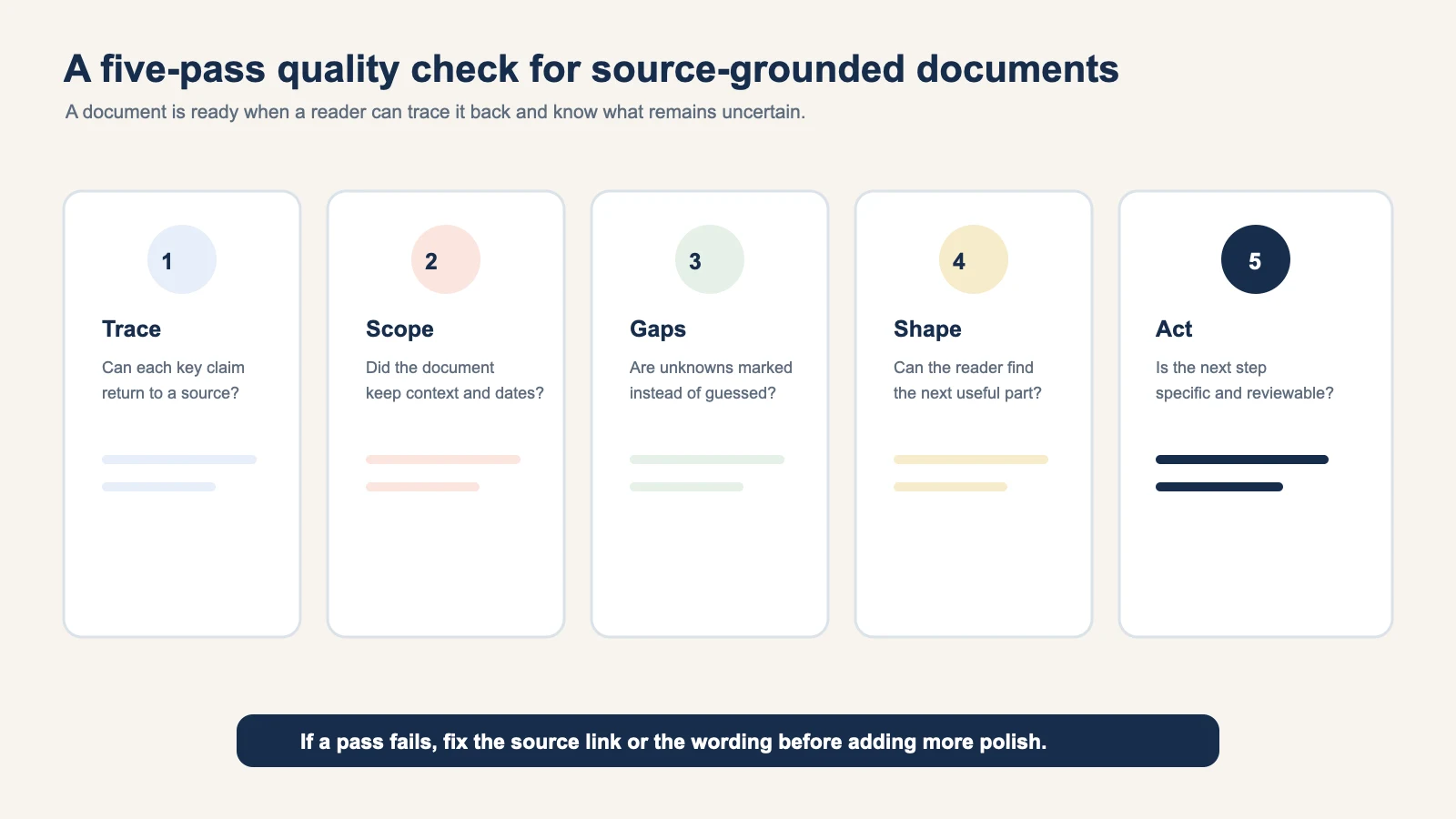
Run these passes in order. Each one catches a different kind of failure.
1. Trace
Can a reader return from every important claim to the source that supports it? Keep the URL, filename, screenshot, message timestamp, or PDF page next to the claim. If a claim combines two sources, name both.
The W3C PROV overview describes provenance as information about the entities, activities, and people involved in producing something. You do not need a formal provenance graph for a personal document. You do need a short path back to the material that matters.
2. Scope
Does the document say what it reviewed and what it did not? Add the page range, thread slice, section, date range, or link access date. A correct sentence from page 4 can be misleading if the reader thinks you reviewed the full report.
Scope also applies to time. A message that says “tomorrow” needs its local timestamp. A calendar suggestion needs the source date and time zone when those details affect the outcome.
3. Gaps
Are unknowns marked instead of guessed? Look for missing end times, cropped screenshots, unnamed owners, conflicting revisions, inaccessible links, and tables without units. Use simple statuses such as Confirmed, Supported, Candidate, and Unresolved.
The NIST AI Risk Management Framework emphasizes documenting context and identifying risks. In a source-grounded document, the risk is often small but concrete: a reader may attend the wrong event, use the wrong file, or repeat an unsupported claim.
4. Shape
Can the reader find the next useful part? Choose a document mode that matches the task:
- Action: tasks, dates, owners, and blockers.
- Decision: options, rationale, and open questions.
- Understanding: concepts, evidence, and follow-up questions.
- Reference: definitions, links, and stable facts.
If a source needs several outcomes, keep one clear document and show the possible next steps. A summary at the top can help orientation, but it should not hide the fields that someone needs to check.
5. Act
Is the next step specific and reviewable? “Do something about the report” is not a next step. “Ask Morgan to confirm the table's units before Friday” is. A calendar handoff should name the event fields to review. A workspace export should name the destination. A Learning session should state the question.
A failed document and its correction
Here is a small example from a hypothetical event screenshot.
Failed version:
Team workshop, Friday at 2 PM, add it to the calendar.
It sounds useful but leaves several problems hidden. Which Friday? Is 2 PM the start or arrival time? What time zone? Where is the event? Is the screenshot a confirmed invitation or a suggestion?
Corrected version:
| Field | Reviewable value |
|---|---|
| Source | Original screenshot, received Tuesday at 09:10 Pacific time |
| Title | Team workshop |
| Date | Friday, year needs confirmation |
| Start | 2:00 PM, explicit in the image |
| Arrival | Not stated |
| Time zone | Not stated |
| Location | Harbor Room, address not shown |
| Status | Candidate calendar entry, user confirmation required |
The corrected version is longer by a few lines but safer to use. It tells the reader exactly what to confirm. When a strong time signal is present, Recap can prepare a reviewable Calendar Sheet. The user still confirms, edits, or cancels before anything is sent.
Review each source type with the right question
The five passes stay constant, but the questions change slightly:
- Screenshot: Is any field cropped or too small to read?
- Link: What page version and section support the claim?
- PDF: Are page numbers, table headings, units, and footnotes intact?
- Message: Are proposals separated from decisions, with timestamps preserved?
- Video or audio: Is the timestamp attached to the statement or scene?
This is why “accuracy” is not one number. A title can be clear while a time zone is unresolved. A quote can be exact while its scope is wrong. Review at the field level.
Keep the source close to the next step
Once the checklist passes, choose where the document should go:
- Use source-to-workspace when the material belongs with project notes, files, or tasks.
- Use source-to-PBL Learning when a question needs evidence, perspectives, and reflection.
- Use the Calendar path only when the date, time, and destination are ready for review.
The source-grounded document is the shared layer. It keeps the evidence available even when the next destination changes.
A printable review card
Copy these five lines into your own workflow:
- Trace: every key claim has a source path.
- Scope: the reviewed range and version are visible.
- Gaps: missing or conflicting details are labeled.
- Shape: the document mode matches the job.
- Act: the next step is specific and reviewable.
If one line fails, fix the source link or the wording before adding more polish. A grounded document is not the one with the most text. It is the one a careful reader can check and use without guessing.
Review in pairs when the stakes are higher
For a routine personal note, one careful pass may be enough. Add a second reader when the document will change a shared calendar, guide a decision, or become a reusable team reference. Give the second reader the source and the document together. Ask them to mark only three things: a claim they cannot trace, a field they think is too certain, and a next step they cannot perform.
This review is deliberately narrow. It does not ask another person to rewrite your style. It checks whether the document works for someone who did not live through the original conversation. Record the corrections in the document's source or uncertainty fields, then remove the reviewer's notes if they are no longer useful. The final result should remain readable without requiring a private explanation.
If the second reader finds a conflict, preserve both source statements until the owner resolves it. If they find a missing page or link, add that dependency instead of filling it from memory. A short review loop protects the document's future reader and makes the correction path obvious.
Continue in Recap
Turn this source into a Recap Document
Make it easier to read, then send time-based details to Calendar, export it to Workspace, or start PBL Learning.