

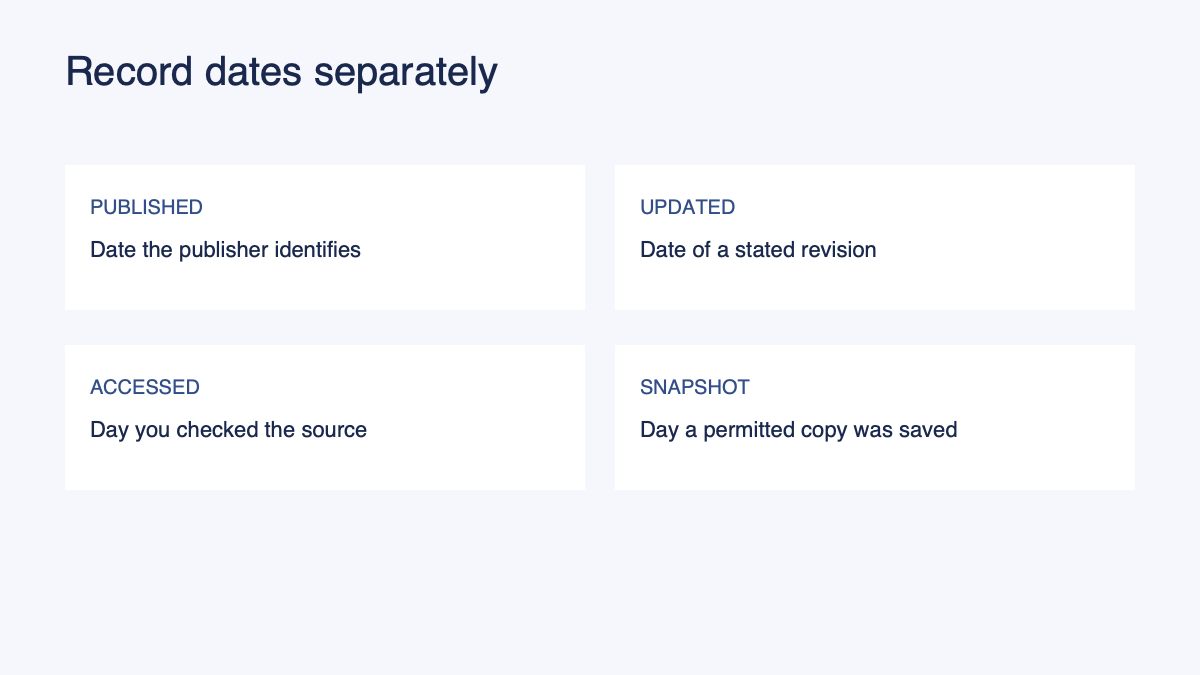
A source can carry several dates, and each answers a different question. The publication date tells you when the publisher says the work was issued. An update date may identify a later revision. Your access date records when you looked. A local snapshot date records when you saved a copy, if you had a reason and permission to keep one.
Keeping those fields separate makes it easier to find the version behind a note. It also prevents an access date from becoming an invented publication date.
A date record you can copy
| Field | Record | If missing |
|---|---|---|
| Source and address | Title, author or organization, and URL or file identifier | Identify the file or record where you received it |
| Publication date | Date stated by the publisher for publication | Write “not stated” |
| Updated date | Date stated for a revision, with any version number | Write “not stated”; do not assume no changes occurred |
| Accessed date | The day you inspected this version | Record the date of your actual review |
| Snapshot | When and where you saved a permitted copy | Write “not saved” |
| Passage locator | Page, section, timestamp, or another useful position | Use a descriptive locator if the source has no formal numbering |
| Open question | An inconsistency or missing detail to resolve | Keep the question visible until checked |
A publisher may use date labels differently. Read the label in context and keep the original wording when it is ambiguous. A date at the bottom of a site may be a copyright year, a page update, or something else. Do not turn it into a precise article publication date without supporting evidence.
A dated example from a public help page
On November 2, 2026, we reviewed Adobe's “Renumber pages in PDFs” help page. The page displayed “Last updated on Jan 21, 2026.” The passage explains that navigation page numbers may differ from printed numbers and that page labels can be customized.
| Field | Worked record |
|---|---|
| Source | Adobe Acrobat, “Renumber pages in PDFs,” linked above |
| Publication date | Not stated in the reviewed page excerpt |
| Updated date | January 21, 2026, as displayed by Adobe |
| Accessed date | November 2, 2026 |
| Snapshot | No local snapshot claimed for this example |
| Passage locator | Opening explanation and Page labels instructions |
| Note | Adobe distinguishes navigation labels from numbers printed on the document. |
| Open question | If the page changes later, check whether the instructions and update date have changed. |
The access date is an observation about this review. It does not mean Adobe published the page on November 2. The update label belongs to the page as shown; it does not by itself describe every change Adobe made. If you revisit the page, make a new check record instead of silently overwriting the earlier one.
For a fictional file received from a colleague, the same structure applies. Suppose a PDF is named workshop-plan-v2.pdf and the sender says it was revised on May 4. Record the file name and the sender's statement as separate fields. Until the document or another reliable record confirms what changed, the name “v2” alone does not establish the revision's contents or its exact date.
Publication is not always a single event
Some works have more than one legitimate publication date. An article may appear online before it is assigned to a print issue. A report may have an edition date and a separately dated correction. A public document may state when a policy takes effect as well as when the notice was published. Those dates describe different events.
Crossref's bibliographic metadata guidance asks publishers to supply relevant date types, including online and print publication dates where applicable. Your personal notes do not need to reproduce a complete metadata record, but they should avoid collapsing distinct dates when the distinction affects interpretation.
A date without a label needs more context. If a PDF says “April 2026” on its cover, record the wording and position. If the body says the policy starts on June 1, keep that effective date beside the relevant claim. Do not treat the cover date as the deadline or the effective date as the day the document was written.
Track a revision without claiming automatic monitoring
When you notice a change, create a second record for the later review. Note the later access date, the version or update label shown, and the passage you compared. If you retained a permitted earlier copy, compare the same section in both versions. A change to the page's general update label alone does not establish that the passage you care about changed.
A simple comparison can use four lines:
- Earlier version or observation, with date and locator.
- Later version or observation, with date and locator.
- The exact difference you verified.
- Any uncertainty, such as missing earlier text or a changed URL.
If you have only the later version, say that. You can record that it differs from an old note, but you cannot know whether the source changed or the note was incomplete without the earlier evidence. Ask the source owner or find an authoritative version history if the distinction matters.
A saved copy can help preserve a record, but storage and sharing rights depend on the source and your circumstances. Keep private material in an appropriate location. If a colleague cannot access a source, request permission or provide an approved alternative instead of assuming your access transfers to them.
Record the date alongside the relevant claim
A long document can contain information about several periods. Place the observation's date or scope next to the claim rather than putting one date at the top and assuming it applies to everything. A report published this year may discuss last year's data, and a forecast may cover a later period. Both the publication date and the data period may be necessary to interpret it.
For a web page with no visible publication date, record “not stated” and your access date. For a document with an update history, keep the version that contains the passage you used. For a PDF, record the page number and physical position if they differ. These are finding aids; the final citation still follows the applicable style.
The MLA Style Center advises citing the edition actually consulted. Its example concerns digital and print editions, but the underlying practical question is relevant here: can your reader identify the version you used? Do not assign details from another edition without consulting it.
Prepare the record for a next step
Use the evidence locator template to keep dates, a passage, note status, and open questions together. The source-grounded document checklist can help you review the rest of a document, and the source-to-structured-document guide covers the broader workflow.
Before you export or share a note, verify that the version identifier still matches the passage. If a newer source appears, decide whether you need a fresh review. Preserve the earlier observation when it explains a previous decision; add the new evidence with its own date rather than rewriting the history of what was known.
Questions
Is the access date the same as the update date?
No. The access date is when you reviewed the source. The update date is what the publisher identifies as a revision date, if supplied.
Does a new update date prove a particular paragraph changed?
No. Compare the relevant passage across versions or consult a reliable change record before stating what changed.
What if the source has no visible date?
Record that the publication or update date was not stated in the version you reviewed. Keep your own access date and a locator so the passage can be checked later.
Continue in Recap
Turn this source into a Recap Document
Make it easier to read, then send time-based details to Calendar, export it to Workspace, or start PBL Learning.