

Information rarely arrives in one tidy format. A screenshot may contain the date you need, a link may contain the background, and a PDF may contain the definition that makes both sources understandable. The practical problem is not collecting more material. It is keeping the useful context when those formats meet.
This guide gives you a format-by-format intake method. The goal is a readable, source-grounded document that shows what the material says, what it suggests, and what still needs a check. The source-to-structured-document tool is built for that middle step. What is a Recap Document? explains why a structured result is more useful than a loose pile of excerpts. For the broader framework, read From Raw Source to Structured Document.

Make one intake card for every source
Before merging anything, write a small card for each source:
- Origin: sender, publisher, workspace, or URL.
- Captured: when you received or reviewed it.
- Scope: page numbers, thread, section, or time range.
- Purpose: the decision or action you hope the source will support.
- Status: confirmed, supported by context, or unresolved.
This prevents a common error: combining two statements while forgetting that they came from different dates or different versions. The W3C PROV overview calls this kind of context provenance. A personal workflow does not need a formal graph, but it does need a visible trail back to the material.
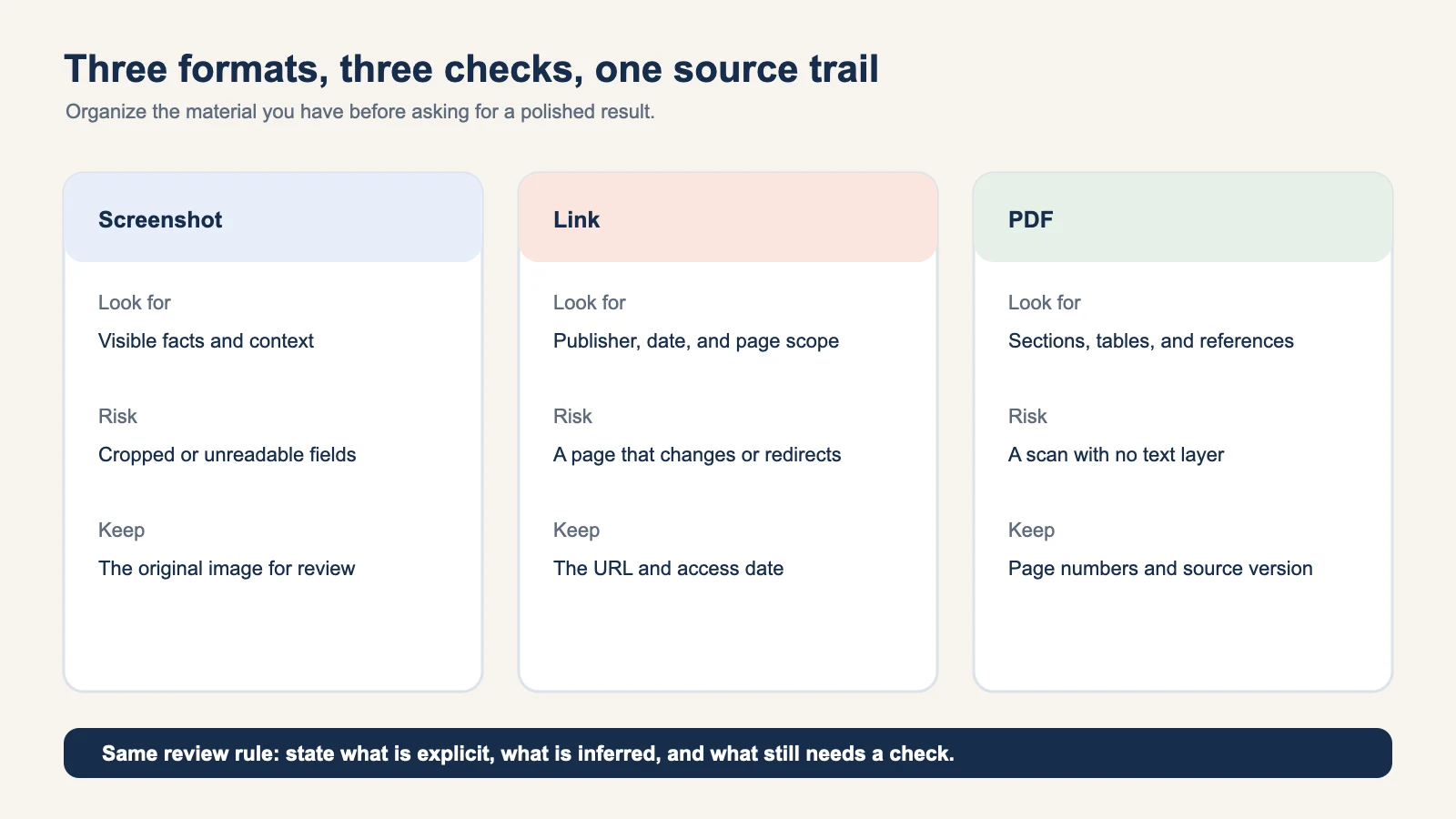
Screenshots: preserve the frame and the missing pieces
Read a screenshot from edge to edge before copying a sentence. Mark visible names, dates, times, locations, URLs, and instructions. Then inspect the borders. A cropped footer may contain the time zone. A notification timestamp may be the only context for the word “tomorrow.” A small caption may turn one apparent event into two deadlines.
The intake card for a screenshot should keep the original image, not only a transcription. Record:
- What is explicit and readable.
- What is implied by nearby context.
- What is cropped, blurry, or absent.
If the source contains a time-bearing action, a reviewable Calendar Sheet can be useful after the fields are mapped. Keep the review boundary clear. A suggested title or date is not a confirmed commitment.
Links: record the page you actually used
Links look simple because the address is compact. The content behind the address can change, redirect, or include several unrelated sections. Keep the publisher, page title, publication date when available, and the section that supports your note.
Separate the page's claim from your interpretation. For example:
| Layer | Example |
|---|---|
| Source says | The publisher defines a term in section 2. |
| Context | The definition is limited to the stated scope. |
| Your use | This is the meaning needed for the current decision. |
Use the full URL in the source card. The URI syntax specification explains why a URI is an identifier rather than a promise that its content will remain unchanged. Keeping the access date makes later review possible.
PDFs: keep page and table context
A PDF is often a small publication, not a text blob. Start with the title page, revision date, section headings, tables, footnotes, and references. If it is a scan, say so. If a table has units or a multi-line heading, keep them attached to every extracted value.
The format is designed to preserve page appearance across systems. Adobe's PDF overview describes that purpose, which is why page references are valuable when a reader needs to verify a claim. A line copied without its page, heading, or unit can become misleading even when every character was transcribed correctly.
Use a simple PDF pass:
- Note the document purpose and revision.
- List the sections that matter for your task.
- Capture claims with page numbers.
- Capture tables with headings, units, and footnotes.
- Mark questions where the PDF is silent or contradictory.
Messages: separate facts, decisions, and offers
Message threads mix several speech acts. “The draft is in the folder” is a fact. “Let us ship Friday” is a proposal until someone agrees. “Friday may work” is a candidate, not a date you should schedule. Keep the sender and local timestamp for phrases whose meaning depends on context.
An intake card for messages can use five labels:
- Fact: directly stated and attributable.
- Decision: explicitly accepted by the relevant people.
- Open question: asks for information or a choice.
- Candidate date: possible timing that still needs confirmation.
- Next step: an action with a clear owner or follow-up.
This structure is safer than rewriting the entire thread into confident prose. It also makes the result easier to send to Calendar or export to Workspace later.
Merge only after each card is stable
When the individual cards are ready, merge them around the job. If you need to prepare a meeting, put the screenshot's date next to the link's agenda and the PDF's requirements. If you need to write a brief, keep the link's claim next to the screenshot that shows the current state.
Do not merge conflicting values silently. Use a small conflict table:
| Field | Source A | Source B | Status |
|---|---|---|---|
| Date | October 17 | October 18 | Needs confirmation |
| Owner | Alex | Not named | Alex only if the first source is authoritative |
| Link | Full URL | Short label | Keep the full URL |
This is where a structured document earns its keep. A reader can see a disagreement, open the right source, and correct one field without losing the rest of the work.
Pick the document mode after intake
Mixed formats can produce different useful results:
- Action: dates, owners, tasks, blockers, and a reviewable handoff.
- Decision: options, trade-offs, rationale, and unresolved questions.
- Understanding: concepts, evidence, examples, and follow-up questions.
- Reference: stable definitions, links, and source context.
Recap's current workflow turns a source into a readable Recap Document before the user chooses among Calendar, Workspace, and Learning. The source-to-workspace tool is useful when the organized result belongs with a project or knowledge base. The source-to-PBL Learning tool fits a source that needs a question-driven explanation rather than an immediate task.
For a destination-specific checklist, see how to prepare notes before exporting to Notion.
A five-minute review before you share
Read the merged document as if you were a colleague who never saw the raw material. Check:
- Can you find every source and its scope?
- Are dates tied to the right source and time zone?
- Are quotes and claims separated from interpretation?
- Are conflicts and missing fields visible?
- Does the chosen document mode match the next job?
If the answer to any question is no, fix the card rather than adding more prose. Mixed-format organization is reliable when the source trail stays short, visible, and easy to revisit.
Start with the source-to-structured-document tool, attach the source cards, and decide on Calendar, Workspace, or Learning only after the review pass.
Continue in Recap
Turn this source into a Recap Document
Make it easier to read, then send time-based details to Calendar, export it to Workspace, or start PBL Learning.