

A ticket with both a doors time and a performance time should preserve both. Doors open tells you when entry begins; the performance time tells you when the advertised program starts. A required seating time or last-admission rule can add another constraint. Check the labels before choosing the start of your personal calendar entry.
This guide uses a fictional ticket to show the distinction. It does not prescribe a universal arrival buffer or claim that software can infer venue rules from an unlabeled number. Keep the ticket and the organizer's current event information accessible until the visit is complete.
Read the label beside each time
Begin with the words attached to the numbers. "Doors," "show," "check-in," "be seated by," and "last admission" are different instructions. If the screenshot contains only a large time without a label, open the organizer's event page or ask which time it represents.
Real organizers can publish separate fields. Bristol Beacon's Make Space For Rising page distinguishes doors at 19:30 from a start time of 20:00. This is an example of clearly labeled event information, not an arrival rule for another venue or a current booking recommendation.
Keep a stated cutoff separate from the performance time too. An organizer may require seating before the program begins. Your calendar should not discard that requirement simply because the performance is the most prominent time on the ticket.
Work through a fictional ticket
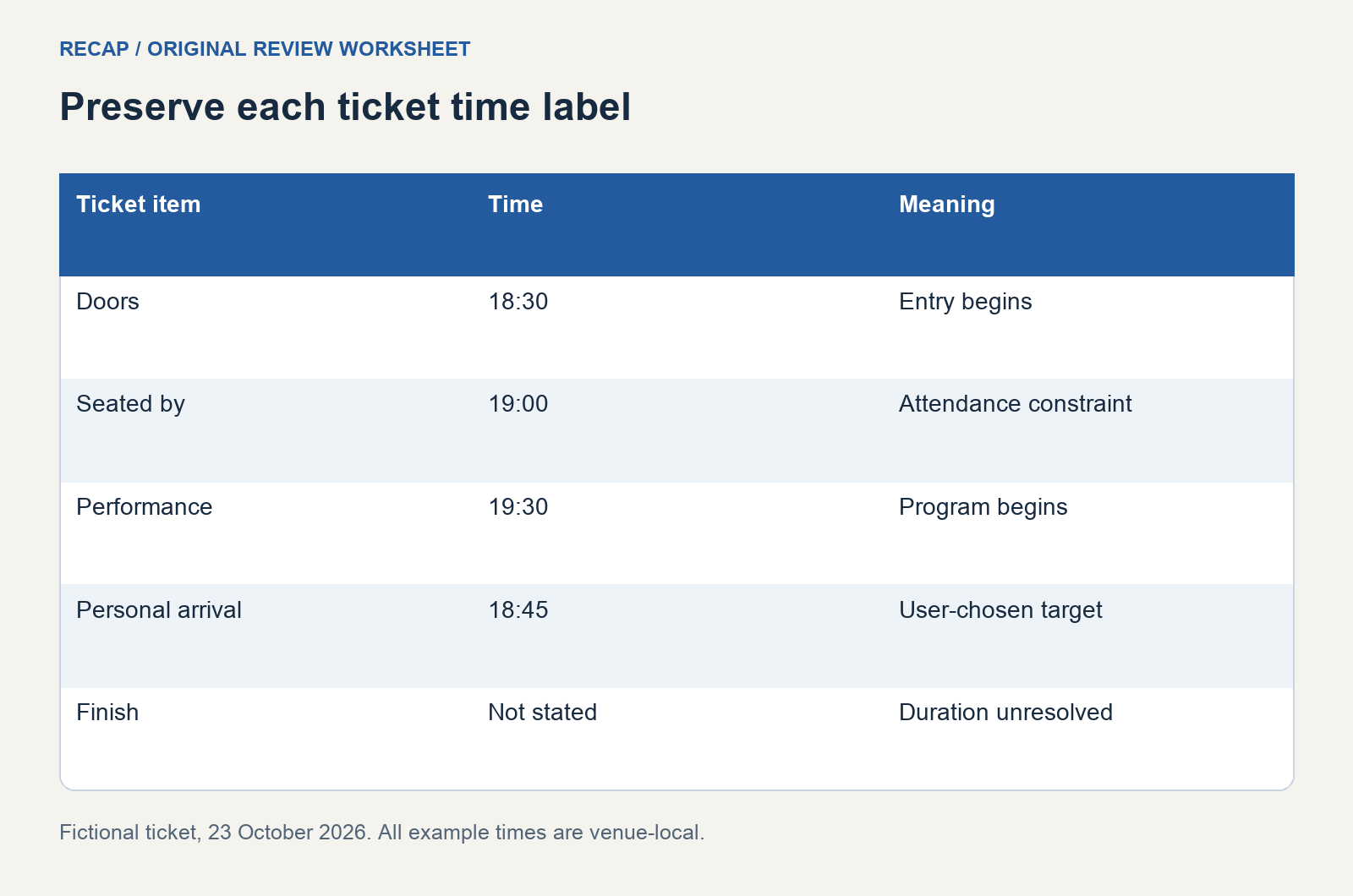
The fictional ticket says: "Community concert, Friday 23 October 2026. Doors 18:30. Be seated by 19:00. Performance 19:30. Venue: Riverside Hall." It gives no end time. All example times are venue-local.
| Ticket detail | Meaning in this example | Calendar treatment |
|---|---|---|
| Doors 18:30 | Entry begins | Keep as an admission detail |
| Be seated by 19:00 | Attendance constraint | Preserve prominently |
| Performance 19:30 | Program begins | Keep as the performance time |
| End time absent | Duration unresolved | Do not invent an official finish |
| Arrive 18:45 | Reader's chosen target | Label as a personal plan |
The personal arrival target is illustrative. It may suit one reader and fail for another. Check travel, accessibility, and admission arrangements relevant to your actual visit instead of borrowing this example's choice.
Decide what the calendar entry represents
A calendar can record attendance, the performance interval, or both through separate fields and notes. Choose a meaning that will be clear when you see it later. If your event begins at your planned arrival time, use a title such as "Arrive for community concert" and keep the performance time in the description.
If you record the performance as the event start, make the required seating time visible and choose an appropriate personal reminder. Do not assume that a notification will communicate every admission constraint. A short title can include the constraint when it matters more than the show time for your action.
Google's event creation guidance describes recording event details. The application accepts fields, but it does not decide which ticket label represents your attendance plan. Make that decision while the original ticket is in front of you.
Keep missing duration visible
Many tickets give a start without a finish. Record the absence rather than presenting a guessed duration as the organizer's schedule. If you reserve a block of time for planning, label its end as your estimate or personal availability boundary.
You may need an approximate block to avoid another commitment immediately afterward. That is a planning choice, not an event fact. Keep the organizer's stated time and your provisional block distinguishable so you can revise the latter if official duration information arrives.
Do the same with travel. An arrival target can account for a journey, but it does not establish the performance time. If a location changes, revisit your travel plan without overwriting the event's stated admission and start labels.
Check date, location, and timezone together
Verify the date associated with the ticket, particularly when a page advertises several performances. A screenshot can show the venue's general opening hours beside a specific event. Record event-specific labels first, then keep general visit information as context.
Check whether the ticket and booking confirmation refer to the same venue and session. If the notice has been revised, compare the new details with the original before adding another entry. The schedule change review template is useful for a changed date or venue.
When traveling, retain the venue's timezone explicitly if the source supplies it. A correct local admission time can appear confusing in a calendar viewed elsewhere. Use the destination's timezone controls deliberately, and inspect what the saved entry shows on the device you will use during the trip.
Add reminders without turning them into rules
Choose reminders for the action you want to take: leave home, check the ticket, or arrive at the entrance. The reminder should support your plan while preserving the organizer's own constraints separately. Avoid adding a standard buffer and labeling it as mandatory unless the organizer stated it.
Google's notification documentation explains notification settings. Check those settings in your own calendar and account. A saved event is not evidence that alerts are enabled on every device, and an alert is not a substitute for checking admission information.
If you share the event with a companion, distinguish the agreed meeting time from doors opening. "Meet outside at 18:45" can be a useful personal agreement. It should not make the venue appear to open at 18:45 or obscure an earlier seating requirement.
Preserve ticket details privately
Keep booking codes, barcodes, and personal contact information out of a shared calendar description unless you intend the recipient to receive them. A source link or a brief note may be sufficient for companions. Inspect sharing permissions before attaching a full ticket screenshot.
The fictional diagram deliberately has no barcode or booking reference. Its role is to explain time labels. When producing your own record, retain enough evidence to identify the booking while minimizing details that others do not need.
Verify the entry against the ticket
After saving, check the date, chosen start meaning, location, and admission notes. Reopen the ticket and confirm that each official time still has its original label. If you added an arrival target or estimated finish, ensure that its personal status remains clear.
Use the event flyer review for other printed event sources and Screenshot to Calendar for the image-processing context. A useful ticket record keeps entry, required seating, performance, and personal planning choices understandable when you need them at the venue.
Continue in Recap
Turn this source into a Recap Document
Make it easier to read, then send time-based details to Calendar, export it to Workspace, or start PBL Learning.