

A useful source can be easy to capture and hard to reuse. A screenshot arrives in a chat. A document holds a decision. A link points to the one detail someone will need next week. You save it, add a sentence, and move on. Later, the note is still there, but the reason it mattered has gone missing.
That is the handoff problem. Moving information into a workspace is not just copying words. It means keeping enough of the source, interpretation, and next action together that the result still makes sense after it leaves the inbox.
A practical source-to-workspace workflow has five parts: name the source, distinguish evidence from interpretation, shape the material for its next use, choose a suitable destination, and check the result after the move. This guide turns those steps into a reusable rubric for Notion, Obsidian, Google Docs, or another system you already use.
A handoff should keep the relationship intact
A note can be accurate and still be hard to trust. It may summarize a claim without saying who made it. It may copy a date while losing the message that explained the date. It may contain a recommendation but not show which parts came from the source and which parts came from the person writing the note.
The W3C's overview of provenance describes it as information about the entities, activities, and people involved in producing data. That information can help a reader assess quality, reliability, or trustworthiness. A personal note does not need a formal provenance graph. It does need the same useful distinction: what is the source, what happened to it, and who added the interpretation? See the W3C PROV overview.
For everyday work, a compact record is enough:
| Field | What to keep |
|---|---|
| Source | Original URL, file name, sender, or capture reference |
| Captured | Date you received or saved it |
| Claim | The statement you may need to act on |
| Evidence | The passage, image, figure, or section that supports it |
| Interpretation | Your reading of the evidence, marked as your own |
| Decision | What you decided, or what is still open |
| Next step | An action, owner, or date if one is known |
Leave a field blank when the source does not support it. Do not fill a gap with a guess. A missing owner is a follow-up question, not an invitation to assign the work to whoever happens to read the note.
Use the five-part rubric
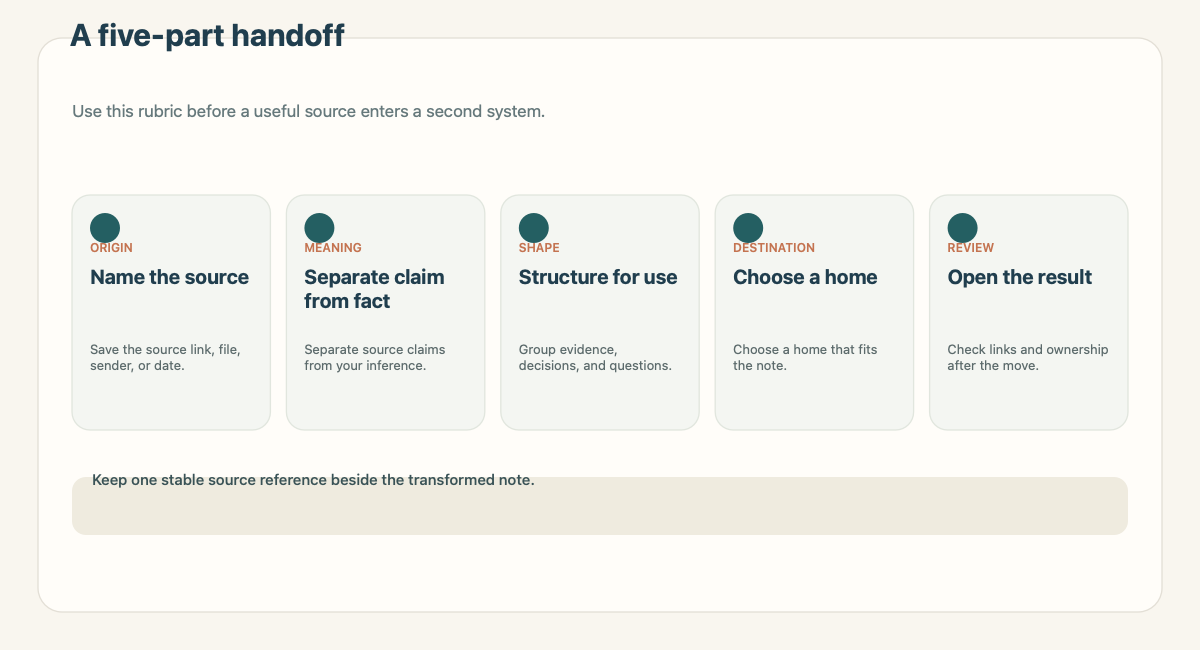
1. Name the original source
Start with a reference that lets a future reader get back to the material. For a web page, save the URL and, when useful, the page title. For a file, keep the file name and location. For a message or screenshot, record where it came from and when you captured it.
A copied excerpt can help someone scan the note, but it is not a substitute for its origin. If the source can change, note the capture date. If it is private or temporary, say that access may be limited. The goal is not to collect metadata for its own sake. It is to make the trail usable when the summary needs checking.
2. Separate evidence from interpretation
Use plain labels. “The notice says the room changes to B-204” is a claim about the source. “This means the workshop will probably start later” is an interpretation. Mixing them makes it easy for a later reader to treat an inference as a confirmed instruction.
This distinction matters most when someone will make a decision from the note. Preserve the exact date, amount, name, or requirement as shown. Add your explanation below it. If the supporting passage is short, quote it with enough surrounding context to avoid changing its meaning. If the source is a chart or long document, record the page or section that contains the evidence.
3. Shape the material for its next use
A source dump creates another place to search. A useful note answers a small set of questions: What is this about? What matters? What supports that conclusion? What should happen next?
Choose a structure that fits the work. A reference note might have a short summary and links. A decision note needs options, evidence, the choice, and any condition that could change it. An action note needs an owner and due date only when those details are known. A meeting note may separate decisions from discussion so the next person can find the commitment without reading every comment.
Keep source language where precision matters. Rewrite for clarity where it does not. The new document should make the material easier to use without claiming more than the source says.
4. Choose a destination that suits the shape
A single page works well when the note is self-contained. A database or table makes more sense when the same fields recur across many notes and you need to sort or filter them. A shared document suits a draft that needs comments or joint editing. A Markdown file can be a good fit for linked notes that should remain easy to move.
Those are choices about the work, not universal rules. A deadline with a named owner may belong in a task system as well as in its source note. A research finding may belong in a project workspace. A rough idea may need no permanent destination yet.
A format check across three common destinations helps show what changes:
| Destination | Useful starting format | What to verify |
|---|---|---|
| Notion | Markdown page or CSV for repeated fields | Whether content became pages or database items as expected |
| Obsidian | Markdown file with ordinary links and properties | Whether paths and links still resolve in the vault |
| Google Docs | A readable outline with headings and source links | Whether reviewers can find open questions and comment in place |
This is a format check, not a claim that Recap or this guide performed a live import into each service. Notion's official guide lists Markdown, plain text, CSV, HTML, and other import options, and notes that import limitations vary by format. Read the current Notion import guide before moving a large or valuable collection. Obsidian documents both Markdown links and its own wikilink format in its internal links guide. For a Google Doc that needs review, Google's help explains how to add comments and assign action items in Docs.
The team prepared one fictional training notice in three representations: a Markdown note, a comma-separated row for repeating fields, and a Docs-ready outline. A local comparison checked that each version carried the same source label, capture date, decision, and open question. No third-party account import was performed. This small check caught the important failure mode: the table version needed an explicit source column or the link was lost.
5. Check the destination after the move
Do not treat a successful copy or import message as proof that the note is ready. Open the destination item. Check the heading order, lists, tables, links, images, and fields that carry a decision. Confirm that the destination is correct and that the people who need access have it.
For a page with a source link, open the link. For a row-based collection, inspect a few records and confirm that dates and text landed in the intended columns. For a shared document, check that the comments refer to the passage they discuss and that unresolved questions remain visible. If a file moved into a folder, confirm the path rather than relying on an old shortcut.
The check should match the cost of failure. A personal reading note may need a quick link check. A decision record used by a team needs a second reader and a clear owner. If a missing source or distorted table would change the decision, stop and fix the note before sharing it.
What the Recap handoff looks like
Recap's current product description follows a source-first sequence: a source becomes a structured, readable Recap Document, then the user can choose among Calendar, Workspace, and Learning. Workspace is one possible next step, not a replacement for a user's notes or task system. The source-to-workspace page and the source-to-structured-document guide describe that positioning. The broader Recap Document guide explains the document that comes before the destination. Current plan details belong on the pricing page.
The screenshot below is a first-party Recap acceptance capture dated August 10, 2026. It shows the Send to Workspace sheet and several destinations in a not-connected state. It is evidence of that screen at that date, not a promise that every destination is available or connected today.
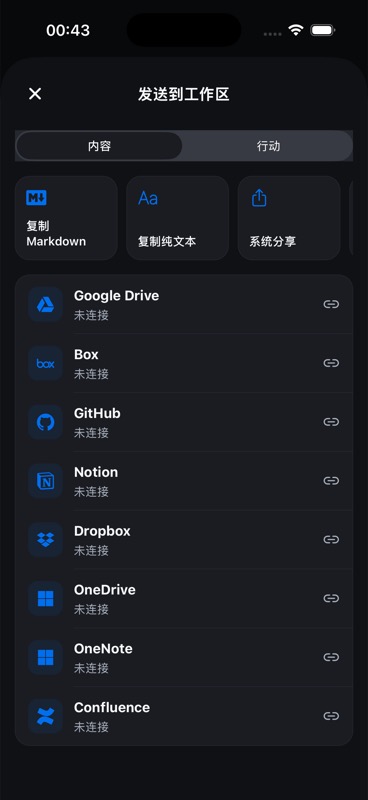
The distinction is useful when writing about product behavior. A page can explain the user's choice without promising an integration, a successful export, or a specific destination state. Check current product notes before naming a supported route. If the product is still the subject of a review, link to the source-to-workspace workflow page and keep the next action in the user's hands.
Decide what stays authoritative
Some information belongs in more than one place, but one location should be the record people update. A calendar entry may hold the time and location. A workspace page may hold the background and decision. The original notice may remain the evidence for why the date was chosen. If the full notice is copied into each system, a later correction can leave several conflicting versions.
Before you move a note, decide what the destination is meant to own. Keep the short summary and source link in the new location when that is enough. Link to a longer record when it already has an owner and a stable path. If the destination will become the current record, label it clearly and retain the source reference so a reader can see where it came from.
This small choice makes later maintenance easier. When a date changes, the owner knows which record to update and which related note needs a reference or correction. When a document is superseded, mark it as such rather than letting an old copy look current. A source link also gives a future reader a way to check whether the original has changed.
Keep the transfer narrow. If a private message contains details that the destination audience does not need, do not copy them just because the export makes it easy. Check access before sharing, and follow the rules that apply to the source and workspace. A short note with the relevant passage may be safer and easier to maintain than a full source dump.
A small example
Suppose you save a training notice with a date, a room, and a link to the agenda. The source says the session is on October 14 at 2 p.m. in Room B-204. Your interpretation is that the room changed from the earlier notice. The decision is to update the calendar after checking the organizer's latest message. The open question is whether the agenda link also changed.
A useful note would keep those four things separate. The original notice stays linked. The date and room are copied exactly. The interpretation is labeled. The calendar update remains a planned action until it is confirmed. When the note moves into a project space, the destination can show the decision while retaining the source link and open question.
This example is fictional. It shows a structure, not an outcome from a Recap customer or a claim about an automatic workflow.
Make the rubric easy to repeat
For each handoff, ask:
- Can another person find the source?
- Can they tell what the source says and what I inferred?
- Does the note use a structure that fits its next job?
- Is the destination the right home for that structure?
- Did I open the destination and verify the important details?
If the answer to one of these is no, the note is not ready to travel. Sometimes the fix is a missing URL. Sometimes it is a better title, a clearer decision, or a smaller destination choice. A short repair at this point costs less than asking a colleague to reconstruct the original context later.
The useful output is not the longest note or the most elaborate workspace. It is a document that preserves enough context for someone to understand it, check it, and choose what should happen next.
Continue in Recap
Turn this source into a Recap Document
Make it easier to read, then send time-based details to Calendar, export it to Workspace, or start PBL Learning.