

A decision brief from one source records what that source establishes, what you need to decide, and which missing evidence prevents a responsible choice. Start with a question. Keep each extracted claim tied to a location in the original. Add your requirements in a separate field so that a preference cannot quietly become a fact.
This guide includes an original reusable worksheet, a public specification example, and a fictional project notice. The examples are manual reading exercises. They are not demonstrations of Recap extraction accuracy, customer stories, or purchase recommendations.
Decide what the brief needs to answer
Suppose you save a detailed specification because you are considering a small display computer. A summary can tell you what the board contains. Your decision may depend on something else: whether it will run quietly inside a particular enclosure in a room where people hold meetings. A shorter specification cannot answer that question by itself.
Write a bounded question such as: “Does this source establish enough about display support and operating conditions to justify testing this board in our intended setup?” This question gives you a useful stopping point. You can approve further investigation without pretending you are ready to approve a purchase.
The decision belongs to the reader. The source may never mention your room, budget, maintenance skills, or preferred supplier. Enter those considerations as reader-supplied criteria. If several people are involved, record whose requirement each one represents and whether it is mandatory or negotiable.
NASA's decision-analysis guidance treats evaluation criteria and uncertainty as explicit parts of a decision. Our worksheet is a small reading aid, not NASA's engineering process or a validated scoring instrument. It borrows the useful discipline of stating the criteria before interpreting the options.
Copy the single-source decision brief
Use the following structure in a document you can edit. Empty fields are useful when they identify a real gap. Avoid filling them merely to make the page look finished.
| Field | What to record |
|---|---|
| Decision question | The specific choice, check, or next investigation you need |
| Source identity | Title, publisher or sender, publication date if available, URL or file name, and access date |
| Source scope | Which product, notice, project, population, or version the source covers |
| Explicit facts | Short claims with section, paragraph, page, or row locators |
| Options stated by the source | Only alternatives the source actually names |
| Reader-added options | Other possibilities you introduced, clearly labeled |
| Criteria | Reader requirements, their owner, and any mandatory threshold |
| Evidence by criterion | What supports each requirement and what does not |
| Inferences | Your interpretation and the evidence it depends on |
| Unknowns | Information absent, ambiguous, outdated, or not tested |
| Next evidence needed | A precise question, document, or test that could change the choice |
| Decision status | Ready for a specified next step, or waiting for named evidence |
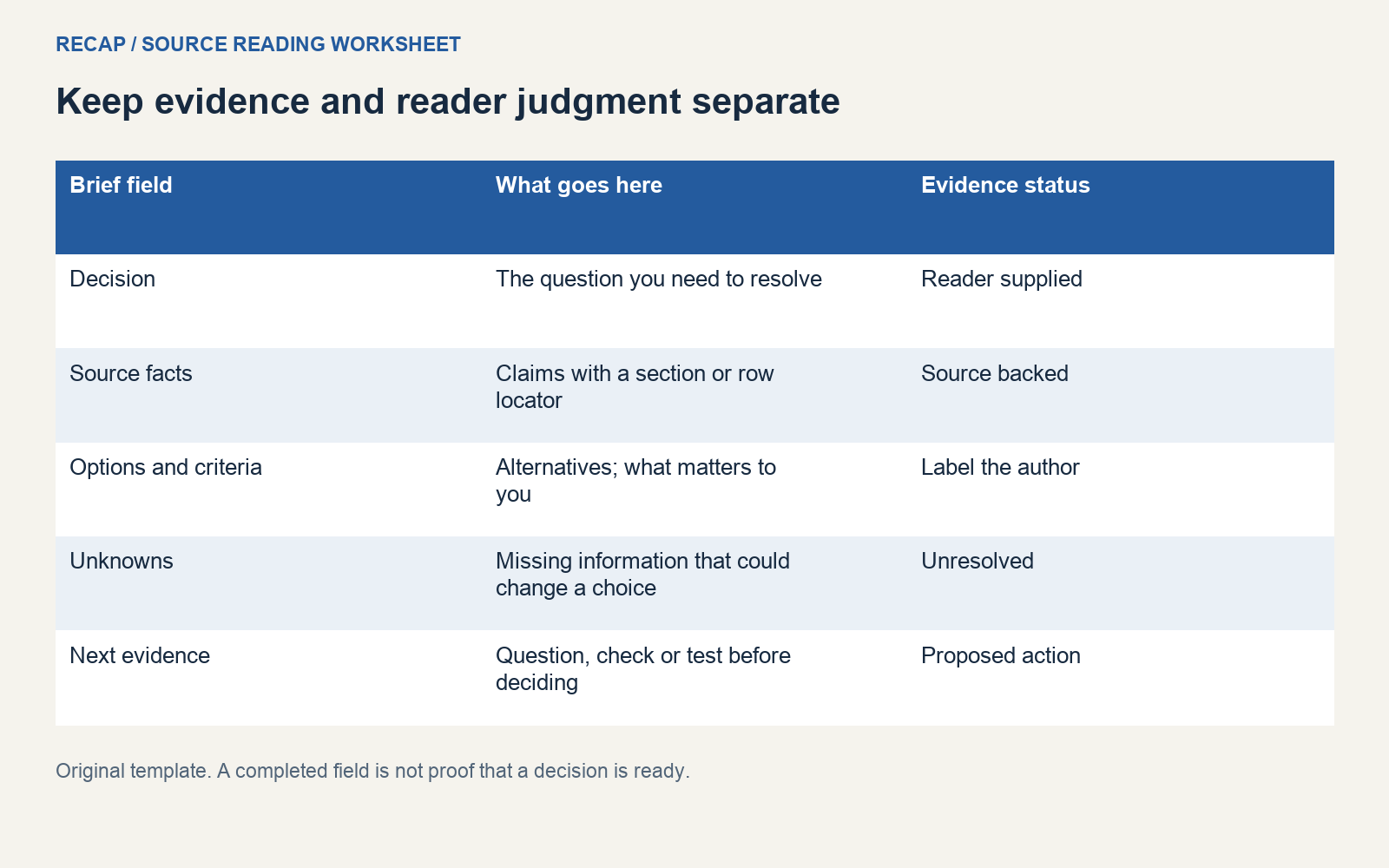
Keep the scope field close to the source identity. A clear statement can still be irrelevant if it describes another version or another population. When the scope is uncertain, write the uncertainty beside the claim rather than hiding it in a note at the bottom.
You can use ordinary prose for the status. “Check enclosure compatibility before ordering” says more than a green confidence badge. A badge needs a defined scale and evidence behind it; otherwise it adds certainty without adding information.
Worked example: read a public specification
Consider the Raspberry Pi 5 specification, checked on October 19, 2026. The page lists dual 4Kp60 HDMI display output. In this example, that is the source-backed capability we record. We do not interpret it as a result from a test with our own displays.
The fictional reader wants two display outputs and quiet operation in an existing installation. These requirements come from the reader, not the manufacturer. The source supports investigating the display requirement. It does not establish the noise of the reader's complete setup or the suitability of that setup for its audience.
| Brief element | Example entry |
|---|---|
| Decision question | Is there enough evidence to plan a compatibility test? |
| Source-backed fact | The specification lists dual 4Kp60 HDMI output |
| Reader requirement | Run two displays in an existing meeting-room installation |
| Additional reader requirement | Keep the complete installation acceptably quiet |
| Inference | The stated output capability makes further display investigation reasonable |
| Unknown | Actual display configuration, enclosure fit, noise, and the test's acceptance criteria |
| Status | Investigate; no purchase approval recorded |
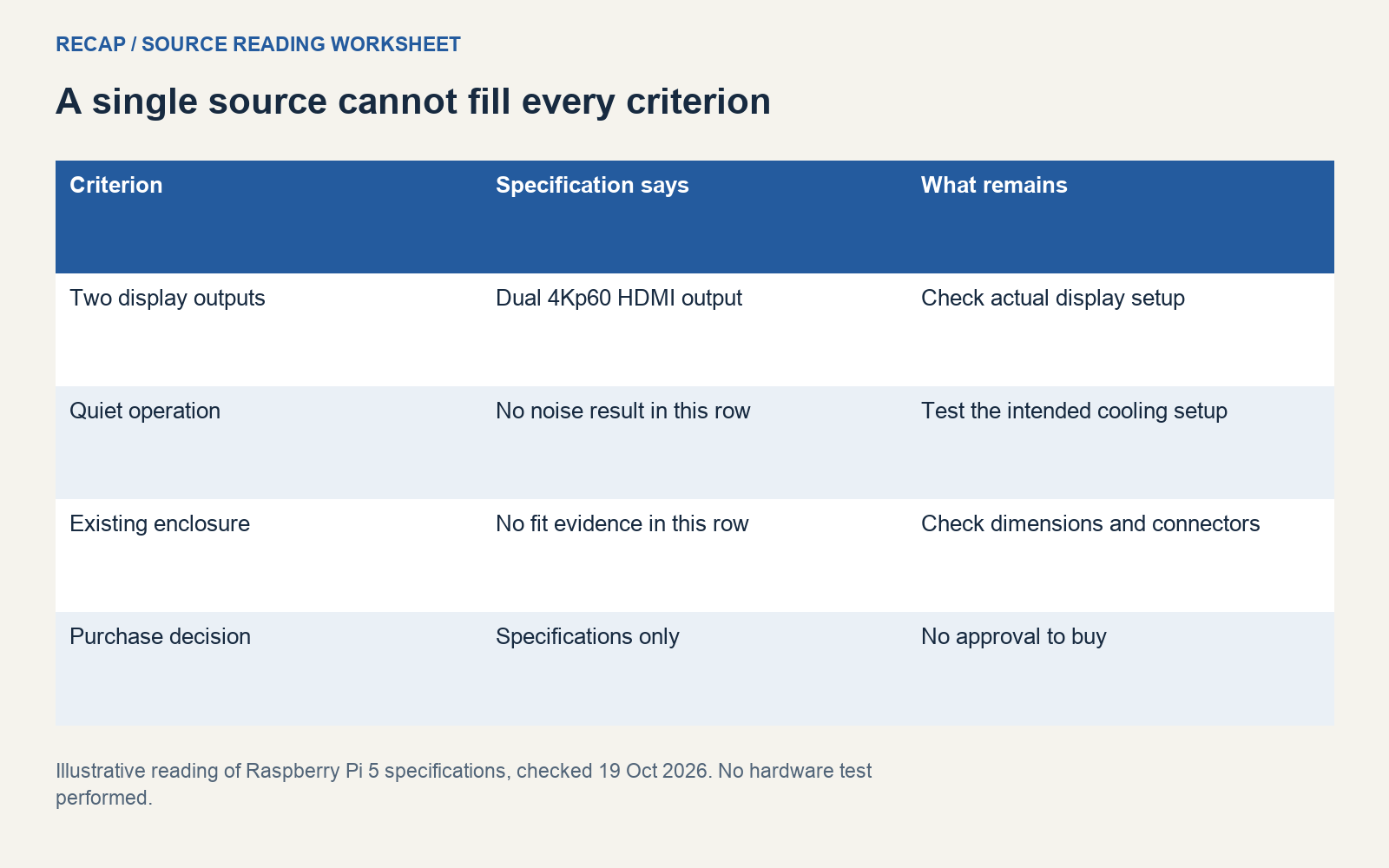
Notice how little manufacturer detail is required. Copying every port, processor feature, and accessory would make a longer brief while doing little to resolve this reader's question. Include the details that support or challenge a criterion. Leave the full specification linked for anyone who needs to inspect the rest.
Do not add a second product with guessed specifications to make this look like a comparison. One source may establish only one candidate. You can record “compare with an alternative” as a next investigation, with the alternative still unspecified. That accurately describes the work remaining.
If the page changes later, the access date helps explain what you read. For a consequential choice, retain an authorized local source copy or a short factual extraction with its locator. Avoid circulating private documents or copying a whole publication into an externally shared brief without checking what you are permitted to share.
Worked example: a fictional project notice
Here is a separate fictional source, written for this guide:
Prepare a short welcome page for the volunteer induction. Use the current welcome materials. Share a draft on Friday so the group can review it before the next session.
Treat this notice independently from the hardware specification. There is no shared project and no reason to merge their facts. The explicit deliverable is a short welcome page. The notice calls for a draft on Friday and identifies existing materials as an input. It does not name an assignee, a calendar date, the approved materials folder, or a final approver.
The reader's decision question could be: “Can I start a useful draft from this notice, and what must be confirmed before I promise a delivery time?” The source supports preliminary reading or outlining. It cannot establish a firm delivery commitment until the reader resolves the missing timing and ownership details.
An actionable unknown is “Which calendar date and cutoff time does Friday mean?” A weak unknown is “Need more clarity.” The first can be answered by the sender. The second makes the sender work out which part you failed to understand.
The reader might propose drafting a one-page outline while waiting for confirmation. Label that as a proposed approach. It was not specified by the source. The reader might also suggest using last year's welcome pack, but the notice does not identify that pack as current. Record it as a candidate input, not an approved reference.
The Atlassian project-poster exercise provides a useful related planning practice: make knowledge gaps and assumptions visible as the project develops. Our fictional notice exercise concentrates on the gaps in one message, before a team has agreed a full plan.
Separate facts, inferences, and unknowns
A source-backed fact describes what the source explicitly states. An inference connects that information to a question you are trying to answer. An unknown names something you cannot establish from the material available. Keep the labels even when the distinction feels obvious to you.
For the fictional notice, “the sender requests a draft on Friday” is source-backed. “A rough outline may be enough for the first review” is an inference. “The reviewer and expected level of detail are not named” is an unknown. These statements can coexist without being collapsed into a stronger instruction.
GOV.UK's research-analysis guidance distinguishes recorded observations from what an analyst thinks they mean. That distinction also helps when reading a source for a decision. Your interpretation may be valuable, but it should remain visible as your interpretation.
Use locators that another reader can follow. A source URL identifies a page; “Specification, display output” identifies the relevant part. A PDF needs a page and heading. A short message may need only its date and the sentence in question. A table needs the row and the complete column context.
When an inference depends on several unverified steps, split the chain. “The source lists two outputs, therefore our installation will work” skips configuration, cables, software, environmental conditions, and the reader's acceptance test. Recording those gaps may lead to a small test rather than a confident but unsupported recommendation.
Give missing evidence a useful next step
Ask what evidence could change your decision. If an unknown would not affect the next step, it may belong in reference notes rather than at the top of the brief. If it could rule out an option, give it a clear question and an owner for obtaining the answer.
For the hardware example, ask which complete setup should be tested and what quiet enough means to the people using the room. For the project notice, ask which Friday is intended and who can confirm that the materials are current. These questions address different kinds of uncertainty, so they need different evidence.
Avoid invented due dates for the questions themselves. You can choose your own follow-up time, but mark it as your plan. A deadline extracted from a notice and a reminder you set for yourself have different origins, even if they appear in the same calendar.
If new evidence arrives, make another source record and identify what it resolves. Do not silently rewrite the original source as though it always contained the answer. A brief can have a revision note: “Enclosure dimensions confirmed separately on October 21.” That preserves the original evidence boundary without forcing someone to reconstruct the conversation later.
Record a conflict without choosing a convenient answer
If a later source contradicts an earlier claim, keep the two statements in separate rows. Record each source's date, scope, and locator. Check whether they describe different versions or conditions before calling them incompatible. Ask which source has authority over the specific question you are deciding. If that cannot be established, leave the criterion unresolved. Choosing the answer you prefer would conceal the evidence problem from the next reader.
Use the result in your existing workflow
Recap starts with a source and creates a structured readable Recap Document. Calendar, Workspace, and Learning are parallel next steps from that document. The decision worksheet here is an editorial method you can use when reviewing a source; it is not a claim that Recap always emits these exact fields or reaches a correct recommendation automatically.
For background on the foundation, read what a Recap Document contains and the source-to-document guide. The structured-document entry point starts from the source you want to organize.
A time-bearing item may belong in Calendar after you review it. A brief you want to keep or share may belong in your existing workspace; see source to Workspace. A difficult concept or unresolved explanation may deserve Learning. Choose the next step for the source in front of you, with the unknowns still visible.
Before you use the brief to approve work, read its decision question again. Check that every mandatory criterion has evidence, that proposed actions are labeled, and that unresolved questions are assigned rather than concealed. If the available source supports only further investigation, record that as the outcome. It gives the next reader a clear place to continue.
Continue in Recap
Turn this source into a Recap Document
Make it easier to read, then send time-based details to Calendar, export it to Workspace, or start PBL Learning.