

Read a data table by carrying its labels, units, population, and notes with the values you extract. A correct number can produce an incorrect claim when its denominator disappears. Before writing a conclusion, state exactly who or what each number describes.
This guide uses one row from the U.S. Bureau of Labor Statistics American Time Use Survey. The arithmetic is shown explicitly and checked by code. It is a reading exercise, not an estimate of Recap productivity, a recommended work schedule, or a demonstration of automatic table extraction.
Keep the complete column context
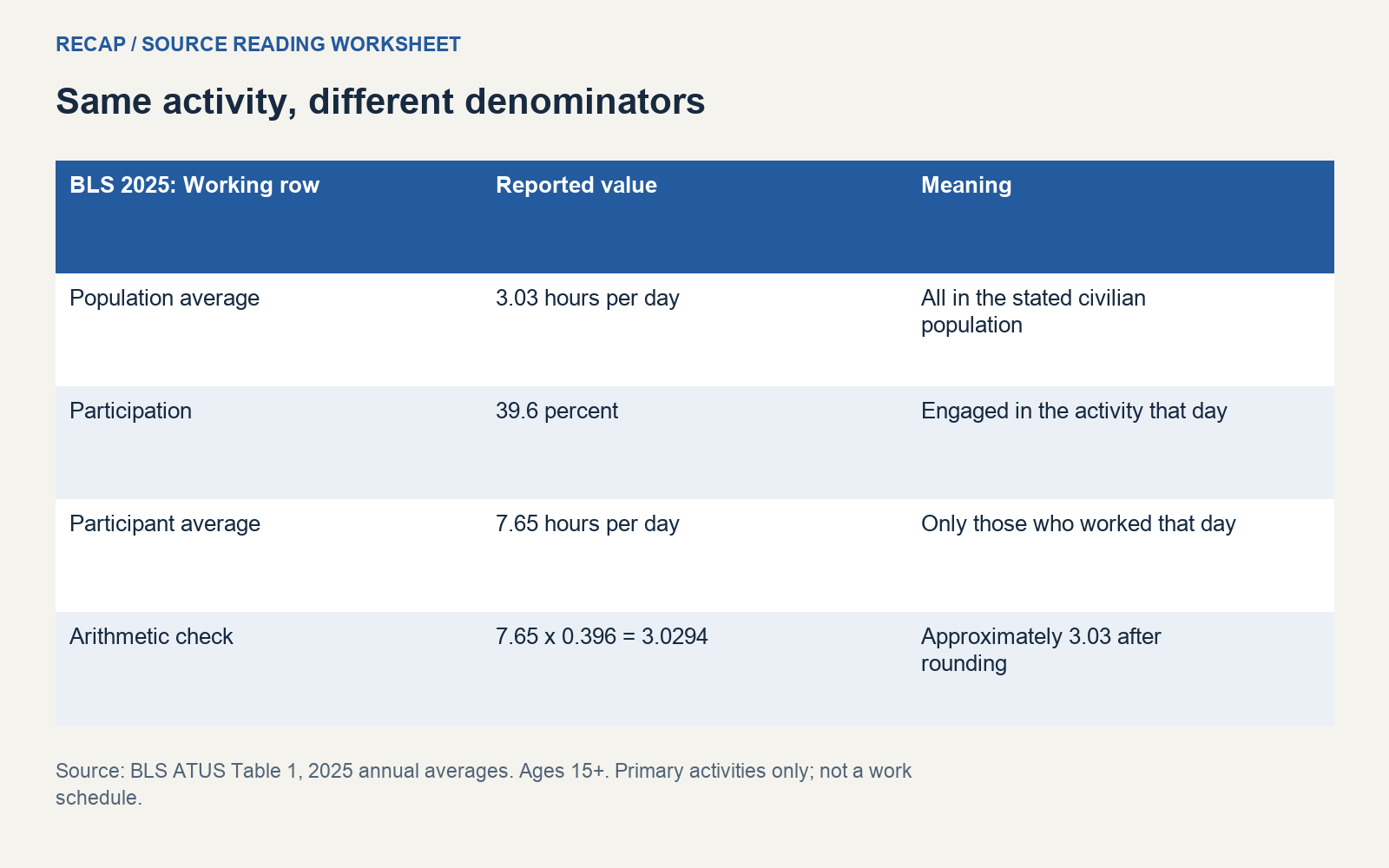
BLS Table 1 for 2025, checked on October 19, 2026, reports several measures beside each activity. In the Working row, the total-column values are 3.03 hours per day for the stated civilian population, 39.6 percent engaged on a day, and 7.65 hours per day among those who engaged.
These values answer different questions. They are not three competing estimates of the same average. The table's notes say the data concern people aged 15 and older and count primary activities. Retain those limits when you quote a value outside the table.
Write the period as 2025 annual averages. A reader who sees only “average hours” might assume the current month, an ordinary weekday, or the schedule of a full-time employee. None of those descriptions is established by this row alone.
Use a compact context record
For every extracted value, save enough information to reconstruct its meaning.
| Item | Example context |
|---|---|
| Publisher and source | BLS, American Time Use Survey, Table 1 |
| Period | 2025 annual averages |
| Activity row | Working |
| Population and scope | Stated civilian population aged 15 and older |
| Unit | Decimal hours per day, or percent for participation |
| Denominator | Whole stated population, or people who did the activity that day |
| Relevant note | Primary activities; simultaneous secondary activities are excluded |
| Interpretation limit | Not a personal work schedule or a full-time-worker estimate |
The BLS survey overview provides the broader survey context. Keep methodological background separate from the row you are reading. The overview helps identify the survey's scope; it does not turn this row into evidence about an individual.
Show why the two averages differ
A useful arithmetic check is:
7.65 hours per participant-day x 0.396 participation
= 3.0294 hours per population-day
approximately 3.03 hours after rounding
This calculation connects the displayed measures. It does not reconstruct the underlying survey records or establish an exact identity from unrounded data. The published inputs are rounded, so small differences should not be treated as an error in the survey.
The arithmetic also exposes a common misreading. Saying “people who worked averaged 3.03 hours” attaches the population-average value to the participant denominator. The participant measure in this row is 7.65 hours. Correct the sentence by naming the denominator, not by choosing whichever number makes a stronger headline.
Conversely, using 7.65 hours as an average across everyone in the stated population drops the participation distinction. The corrected statement should identify that it describes people who did the activity on the measured day.
Do not compare unlike denominators
Suppose a fictional report draft says, “Working takes 3.03 hours, but workers actually spend 7.65 hours, so the table understates work by 4.62 hours.” That comparison is invalid. It subtracts values with different denominators and calls the difference a measurement failure.
The valid correction is to say that the table reports an average across the whole stated population and a separate average among participants. The two measures can coexist. Their difference is not evidence that either value is wrong.
The calculated difference, 7.65 minus 3.03, is numerically 4.62. Arithmetic correctness alone does not make a comparison meaningful. Write the interpretation you intend before deciding whether a subtraction or percentage change answers it.
Avoid comparing this annual population measure with your own Monday timesheet as though the two were equivalent. A personal record can be useful for your planning, but it has a different population, period, collection method, and purpose.
Preserve decimal units and footnotes
The table reports decimal hours. The fractional part of 7.65 hours is 0.65 of an hour, which is approximately 39 minutes. It does not mean seven hours and sixty-five minutes. A worksheet that changes the display format should show the conversion rather than silently relabeling the value.
Keep footnotes attached to the relevant row or category. The source's primary-activity limit matters when interpreting activities that can happen together. A table of primary activities cannot by itself measure all secondary activity performed simultaneously.
Do not sum a broad activity category with its own subcategory unless the table explicitly defines them as disjoint. A neat-looking total can count the same time twice. When the hierarchy is unclear, leave the proposed total unresolved and inspect the source's definitions.
Keep missing values and not-applicable markers distinct from zero. A dash that the source defines as not applicable cannot be converted to zero just to make a chart easier to draw.
Separate the table from your interpretation
Save a short source-backed extraction first. Then add an interpretation field explaining why those values matter to your question. If the interpretation needs another dataset, identify it as additional evidence rather than pretending it was contained in this table.
For a fictional meeting about work patterns, the source-backed note could record the three Working-row measures with their denominators. A separate question might ask which population measure would be relevant to the team's planning. The table does not answer that organizational question without more context.
When sharing the note, retain the original URL and access date. If the publisher updates a live release page, another reader needs to know which period you used. Prefer a dated archive for a long-lived comparison when the publisher makes one available.
Recap creates a structured readable document from a source. The worksheet here describes how to review a table; it does not guarantee perfect extraction of merged headers, footnotes, or numerical relationships. Calendar, Workspace, and Learning remain parallel next steps after the document.
Start with the structured-document entry point. Use the source-grounded checklist to review the extracted labels before sharing. If the table will inform a choice, the decision brief template helps record which interpretation is supported and which comparison still needs evidence.
Continue in Recap
Turn this source into a Recap Document
Make it easier to read, then send time-based details to Calendar, export it to Workspace, or start PBL Learning.