

Find the open questions in a project brief by separating what the source actually specifies from what you would need to assume to begin work. Turn each important omission into a precise question for someone with the authority to answer it. A polished rewrite should not make a vague instruction look like an agreed plan.
The brief in this guide is fictional. It describes no real organization, customer, or Recap project. The worksheet is an original manual review aid, not a claim that Recap automatically assigns owners or resolves project ambiguity.
Read the short brief without completing it
Use this fictional message as the only project source:
Prepare a short welcome page for the volunteer induction. Use the current welcome materials. Share a draft on Friday so the group can review it before the next session.
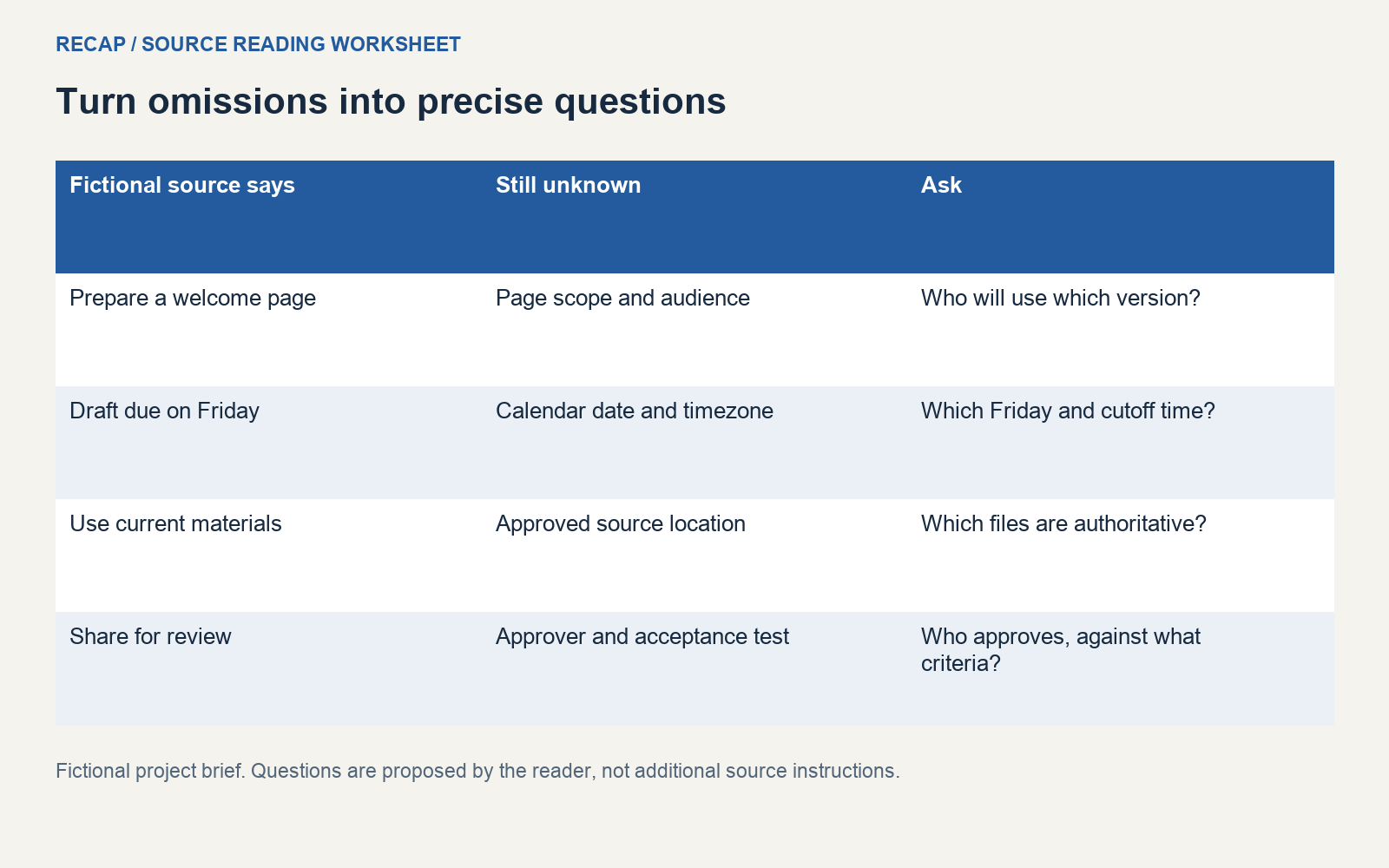
The message specifies a welcome page and a draft for review. It references existing materials and a relative day. It does not specify the audience's needs, where the current materials live, a calendar date, a page format, a delivery owner, or the final acceptance test.
Resist the urge to fill the gaps from habit. Perhaps your team usually reviews drafts in a shared document. That convention can be recorded as context you supplied, but the message itself does not confirm it. A reader who receives only your rewritten brief should still know which details need agreement.
Identify the smallest useful deliverable
“Short welcome page” gives you a starting point, but it leaves scope open. Does the sender want a public page, an internal handout, or a draft outline? Will it be read before the induction or during it? Which version is intended for which audience?
Ask for the distinction that affects your next step. “Should this be a draft page for new volunteers to read before the session?” is easier to answer than “Can you clarify everything?” It also exposes the interpretation you were about to use.
The Atlassian project-poster exercise encourages teams to develop their understanding of the problem and knowledge gaps as work evolves. Apply that idea at a small scale here: keep the unresolved audience and scope visible while a draft is still being defined.
Build a known-to-question register
A register connects each question to a source fragment. It avoids a detached list of generic project questions that nobody can prioritize.
| Source detail | What is known | Open question |
|---|---|---|
| Welcome page | A page is requested | What audience, format, and content are in scope? |
| Current materials | Existing materials should be used | Which location and revision are authoritative? |
| Friday | A relative day is named | Which calendar date, cutoff time, and timezone? |
| Group review | Review is expected | Who reviews, and who can approve the result? |
| Next session | Review precedes a session | What session date and preparation constraint apply? |
Keep “not stated” distinct from “not applicable.” The message does not name an approver. That does not mean approval is unnecessary. It means this source does not establish who can provide it.
Separate the owner from the recipient
Receiving a message is not the same as accepting responsibility for every implied task. The fictional brief does not identify a named delivery owner. It may have been forwarded for advice, sent to a group, or addressed to someone whose availability is unknown.
Ask who is responsible for preparing the draft and who can resolve the content questions. Those may be different people. If you propose taking the work, record that as your proposed commitment until it is agreed.
The Atlassian project-kickoff guidance treats roles and shared project understanding as matters to establish with the team. A short source note cannot replace that conversation. It can make the unresolved ownership question concrete enough to have it.
Avoid attaching an arbitrary person's name to an action just because your task tool requires an assignee. Leave the draft unassigned or keep the ownership question outside the task system until the responsible person is confirmed.
Resolve relative timing before making promises
Friday may sound precise in a live conversation. In a saved message, it can lose its reference point. The sender's local date, forwarding delay, and the date on which you read it can all matter.
Record the relative phrase exactly as supplied, then ask which calendar date it denotes. If timing matters, ask for the cutoff time and timezone too. Do not turn Friday into midnight or the end of your own working day without agreement.
A personal planning reminder is different from a source deadline. You can choose to ask the sender a question tomorrow morning, but label that as your follow-up plan. Do not present it as an instruction extracted from the brief.
The next session also needs identification. “Before the next session” may establish order without establishing a calendar date. Keep that relationship in the note while leaving the missing date unresolved.
Ask what would count as an acceptable draft
An acceptance question should describe an observable result. For the fictional welcome page, you might ask which information a new volunteer should be able to find and who will judge whether the draft contains it.
Avoid inventing a length limit or design requirement because you prefer one. A one-page outline could be a sensible proposal, but “short” does not establish an exact word count. The sender may care more about missing practical information than about the number of words.
Record acceptance criteria as proposed until the relevant reviewer confirms them. That prevents a working suggestion from becoming an apparent promise when the brief is copied into another document.
A useful register can also distinguish questions that block drafting from questions that block publication. You may be able to organize supplied materials before the public format is agreed. You should still make the publication dependency visible.
Keep proposed work separate from authorized work
For this fictional brief, a reader might propose locating candidate welcome materials and drafting an outline. Those are possible next steps. They do not establish permission to publish a page, contact volunteers, or modify a live site.
When the sender answers, add the answer with its own date and source. Do not silently rewrite the original message to include the new agreement. A short revision note can connect the answer to the question it resolves.
Before moving the brief into a task tool, check for invented owners, dates, or commitments. If the tool cannot represent an unresolved field safely, keep the brief in a document until the ambiguity has been addressed.
Keep the source available for the next reader
A source link or message reference helps someone verify why the register contains a question. Keep the short excerpt with its context where you are permitted to share it. For private work, remove unrelated personal or confidential information before forwarding.
Recap creates a structured readable document from a source, with Calendar, Workspace, and Learning available as parallel next steps. This worksheet describes a human review method, not a guaranteed generated field layout or automatic project-management action.
Use the structured-document entry point when starting from a brief. The single-source decision template helps decide what can proceed while evidence is missing. For instructions arriving in a conversation, see turning messages into usable documents. Keep the question that blocks the next commitment close to the source sentence that leaves it unanswered.
Continue in Recap
Turn this source into a Recap Document
Make it easier to read, then send time-based details to Calendar, export it to Workspace, or start PBL Learning.